






Smart Manager for WooCommerce
Smart Manager for WooCommerce: The magic solution for managing your store efficiently and professionally
Smart Manager for WooCommerce is the best WooCommerce add-on for inventory management.
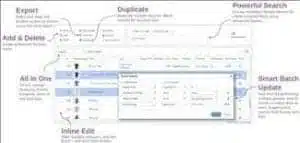
Bulk-edit and manage products, prices, orders, coupons, admin columns, or any WordPress post type using a spreadsheet-like grid editor.

Smart Manager for WooCommerce
Spreadsheet / grid editor
The Smart Manager plugin works just like an Excel spreadsheet, so making changes and navigating is fast and simple.
Manage prices, products, and inventory
Move through the grid to quickly update stock quantities, set/adjust sale price or regular price, allow backorders, delete products, filter inventory, and bulk-edit many WooCommerce products and their variations at once.
Quick, inline, and bulk editing
Create, remove, or update many items at once directly from the grid. Change multiple column values and save in one go. Switch to the native edit screen whenever you need full editing control.
Manage orders, discount coupons…
View all orders on a single screen; filter and search quickly. Change order status, add new orders manually, bulk-edit orders, or export to CSV. Review and find coupons, extend store credits, modify discounts, and bulk-edit them as well.
Admin columns—your way
Show, hide, and edit data columns easily in the grid. Sort, search, bulk-edit, or export any WordPress post type. Smart Manager also supports many third-party plugin data types.
Posts, pages, users… anything
Use the same grid interface to view and manage all custom post types, users, and taxonomies in WordPress and WooCommerce.
In eCommerce, challenges grow daily—especially when managing hundreds or thousands of products, orders, and customers in a WooCommerce store. Smart Manager for WooCommerce steps in as a revolutionary tool that gives you complete control, blazing speed, and an unmatched admin experience.
This guide covers everything you need to know—what it is, its top benefits, and why it’s the preferred choice of successful store owners.
What is Smart Manager for WooCommerce?
Smart Manager is a powerful WordPress add-on built for WooCommerce that lets you manage your entire store through a spreadsheet-like interface (similar to Excel or Google Sheets).
Instead of hopping through endless admin pages, you can:
- View and edit products, orders, customers, coupons, and inventory from a single screen.
- Perform bulk edits with one click.
- Use smart search and advanced filtering.
- Export and import at high speed.
Why Smart Manager is indispensable
Whether you run a small shop or a large operation, manual data management is exhausting and time-consuming. Smart Manager solves this at the root by:
- Saving time: update 100 products in 5 minutes instead of hours.
- Reducing errors: bulk operations cut human mistakes.
- Boosting productivity: fewer clicks mean more focus on growth instead of repetitive admin.
Key features of Smart Manager for WooCommerce
1) Excel-like interface
Work within a smart grid to browse and edit everything easily—product names and prices, stock quantities, order statuses, and customer information—without opening each record individually.
2) Bulk Edit
Need to increase prices for 200 products by 10% at once? Normally it takes hours. With Smart Manager, run the entire operation in seconds via intelligent bulk editing.
3) Advanced filters and search
Find any product or order quickly by price, status, categories, stock quantity, customer name or email, and more.
4) Orders and customers management
Beyond products, edit order statuses (Pending/Processing/Completed), payment/shipping details, and customer data (name, email, address)—all without leaving the main screen.
5) Export / Import
Need to archive data or move it into Excel/Google Sheets? Export or import via CSV with ease for deeper integrations and precise analysis.
6) Coupons and discounts
It’s not just products and customers—you can manage coupons and special offers, adjust rules and expiry dates, all from the same intelligent interface.
How to use Smart Manager — step by step
- Install & activate
Download from the official site or the WordPress repo and activate from the WordPress dashboard. - Choose what to manage
Pick from Products / Orders / Customers / Coupons to load your data into the smart grid. - Filter to target data
Example: “All products in Category X priced under $100.” - Run bulk changes
Select the right cells and update prices, statuses, or any other details in bulk. - Save & sync
All edits save instantly to the WooCommerce database—no page reloads needed.
Free vs Pro
| Feature | Free | Pro |
|---|---|---|
| Product grid editing | ✅ | ✅ |
| Orders & customers editing | ❌ | ✅ |
| Advanced bulk edit | ❌ | ✅ |
| Export & import | ❌ | ✅ |
| Coupon management | ❌ | ✅ |
| Priority support | ❌ | ✅ |
If you manage a large catalog or many orders, upgrading to Pro is a smart investment that elevates efficiency.
Who is it for?
- Managers of large online stores
- Drop-shipping operations needing frequent, fast updates
- Shops with thousands of SKUs or frequent price/stock changes
- Teams needing accurate reports and granular data control



No comment