







Checkout Field Editor for WooCommerce Pro
Checkout Field Editor for WooCommerce Pro is a powerful and versatile plugin for the WooCommerce e-commerce platform.
It allows store owners to fully customize and modify checkout fields on the WooCommerce checkout page, creating a more tailored shopping experience for their customers.

Key Features
Add Custom Checkout Fields
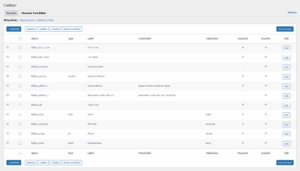
You can add custom fields to the checkout page to collect extra customer information — such as location, delivery preferences, or special notes. Each field can be configured as required or optional, with different data types (text, number, email, etc.).
Edit Default WooCommerce Fields
The plugin also lets you edit built-in WooCommerce fields by:
- Rearranging their order
- Hiding or displaying fields
- Modifying labels and placeholders
- Adding custom instructions
Organize with Field Groups
You can create custom field groups for better organization and a cleaner checkout structure.
Broad Compatibility
The plugin works seamlessly with most WooCommerce extensions and WordPress themes, offering great flexibility.
User-Friendly Interface
It provides a visual drag-and-drop editor so you can manage fields without coding knowledge.
Unlock the Power of Checkout Field Customization
Introduction
WooCommerce is one of the most widely used WordPress plugins for online stores, offering smooth and reliable e-commerce functionality. But one of the most important aspects of any online shop is the checkout page, as it directly impacts customer satisfaction and conversion rates.
A poorly optimized checkout can cause cart abandonment, while a customized one can increase completed purchases.
This is where Checkout Field Editor for WooCommerce Pro comes in — giving store owners the tools to tailor the checkout page easily, without coding.
Key Features in Detail
- Add, Edit, Delete Fields Easily
Supports text fields, dropdowns, checkboxes, date pickers, and more. - Multiple Field Types
Ideal for collecting custom data like sizes, delivery notes, or extra order details. - Data Validation
Enforce rules (e.g., valid email format, required fields) to ensure accurate submissions. - Conditional Fields
Show/hide fields dynamically based on user selections (e.g., gift message field appears if “Gift” is selected). - Integration with Other Plugins
Works smoothly with WooCommerce Subscriptions, CRMs, and other extensions. - Order Data Storage
All custom field data is saved with the order for future analysis and customer service. - Live Preview
Instantly preview checkout field changes before saving.
Benefits of Customizing Checkout Fields
- Higher Conversion Rates – Simplify the checkout process by removing unnecessary fields (can improve conversions by up to 30%).
- Better Customer Experience – Custom fields show attention to detail, boosting loyalty.
- Valuable Data Collection – Gather useful marketing information (preferences, interests, sizes, shipping methods).
- Increased Average Order Value – Personalization at checkout can boost average order value by up to 12%.
Installation Steps
- Purchase the plugin from the official website.
- Go to WordPress Dashboard > Plugins > Add New.
- Upload the
.zipplugin file and click Install Now. - Activate the plugin.
- Start customizing via WooCommerce > Checkout Fields.
Practical Walkthrough
- Go to WooCommerce > Checkout Fields.
- Choose the section to edit (Billing, Shipping, Additional).
- Add or modify fields.
- Configure field type, label, instructions, and validation rules.
- Save and preview changes.
Common Issues & Fixes
- Fields not showing up: Ensure they are enabled and no theme/plugin conflict exists.
- Data not saved: Enable the Save to Order option.
- Unable to save changes: Update all plugins or temporarily disable conflicting ones.
Why We Recommend It on eg-wp
At eg-wp, we consider Checkout Field Editor for WooCommerce Pro an essential tool for any WooCommerce store owner looking to:
- Improve checkout flow
- Collect useful customer data
- Boost conversions and revenue
It delivers deep customization without requiring technical expertise, making it ideal for growth-focused online stores.
Would you like me to also prepare a short marketing pitch (SEO-optimized blurb) for eg-wp.com, so you can promote this plugin as a “conversion booster” on your site?



No comment