







LearnDash LMS ProPanel Addon
The ProPanel add-on for LearnDash LMS is an effective tool designed to enhance reporting and analytics in the LearnDash learning management system (LMS).
It provides advanced features that help course creators and administrators gain deeper insight into learner performance and course effectiveness.

Key Features & Benefits of LearnDash LMS ProPanel Add-on
Advanced reports:
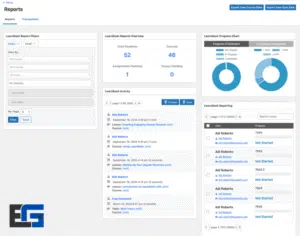
ProPanel delivers real-time reporting on learner activity across all courses. Reports include detailed insights into course progress, quiz results, and user activity—enabling data-driven decisions for instructors.
Custom dashboards:
Create multiple reporting dashboards tailored to your needs. Get a quick, single-page view of core metrics to make monitoring easier.
Learner quiz reports:
Consolidates all quiz-related data in one place so instructors can analyze assessment performance and pinpoint areas where learners struggle.
Enhanced filtering options:
Filter reports by course, group, user status, and progress percentage. This helps identify specific needs and understand learner behavior more effectively.
Activity timeline:
A real-time feed of learner progress that surfaces updates on activities and engagement levels within courses.
Email notifications:
Admins and group leaders can email learners directly from reports—streamlining communication and support.
The Power of the LearnDash LMS ProPanel Add-on
Introduction to LearnDash and ProPanel
LearnDash is a leading LMS that runs smoothly on WordPress, enabling educators, companies, and institutions to build and manage online courses efficiently. With an intuitive UI, robust course-building tools, automated notifications, detailed reports, and broad integrations, LearnDash is a comprehensive eLearning solution.
Among the extensions that significantly elevate LearnDash, ProPanel stands out as an advanced analytics and reporting tool. Built for course managers, it offers deeper visibility into learner performance and engagement, simplifying user administration and boosting course effectiveness.
The significance of LearnDash LMS ProPanel lies in its accurate, data-backed insights that help improve content quality and learner outcomes. With ProPanel, instructors can spot challenges, celebrate wins, and adapt courses to learner needs.
To maximize value, it’s essential to understand ProPanel’s features and practical applications. Beyond reporting, it improves user experience and engagement—driving better learning results.
Core Advantages of ProPanel
- Detailed course performance analytics: Track course success via participation data and completion rates.
- Learner engagement metrics: View time on content, completion percentages, and overall activity.
- Customizable advanced reports: Build reports against precise criteria to support data-driven decisions.
- Easy, role-friendly dashboard: Access key data instantly without technical expertise to improve admin productivity.
These features make ProPanel indispensable for instructors seeking higher-quality online teaching and measurable results.
How to Install the ProPanel Addon with LearnDash
Requirements:
- Updated WordPress and LearnDash (latest versions recommended)
- PHP 7.0+ and MySQL 5.6+
- WordPress configured to allow plugin installation
Installation steps:
- Go to your WordPress dashboard.
- Navigate to Plugins → Add New.
- Upload the ProPanel ZIP file.
- Activate the plugin; ProPanel settings will appear under LearnDash.
Post-installation setup:
- From the ProPanel settings, customize layouts, select which roles have access, and configure reporting features to fit your needs.
Tip: Refer to the included user guide for illustrated steps and best-practice tips.
Best Practices for Using ProPanel
- Weekly data reviews: Schedule time to check completion, engagement, and assessment results.
- Iterate course design: If data shows weak engagement in a section, add interactivity or supplemental resources.
- Motivate learners: Personalize learning paths or use rewards systems where appropriate.
- Keep communication active: Use ProPanel’s outreach tools to gather feedback and drive continuous improvement.
ProPanel Benefits on eg-wp
With the ProPanel Add-on, eg-wp users can leverage:
- A professional, integrated teaching dashboard
- Detailed reports to refine instructional strategies
- Personalized experiences based on each learner’s behavior
- Responsive support aligned with official LearnDash updates
- Full compatibility with other eg-wp educational add-ons for a unified learning experience
Want to build a powerful learning platform on WordPress?
Start today with LearnDash + ProPanel via the specialists at eg-wp.com for professional setup, full training, and reliable performance.



No comment