

Firebox Pro

Firebox Pro


Firebox Pro

The Comprehensive Guide to Its Integration with WordPress

Introduction

Firebox Pro is one of the best plugins for WordPress users, enabling the creation of interactive pop-up windows to improve user experience and increase conversions. With its ease of use and flexibility, website owners can customize pop-ups to achieve their marketing goals. In this guide, we will cover everything you need to know about Firebox Pro and how to make the most of it.

Firebox Pro is a powerful plugin designed to boost user engagement and enhance conversions on your eCommerce site. It offers a variety of features that help you create pop-ups and targeted notifications.

It is an essential plugin for WooCommerce users looking to optimize their online store’s performance through effective strategies for attracting users.

Firebox Pro
Firebox Pro

Features and Core Functions of Firebox Pro

Pop-ups on Exit Intent:

  • Firebox Pro can display pop-up windows when a user is about to leave the site, helping reduce shopping cart abandonment by offering discounts or capturing email addresses.

WooCommerce Integration:

  • The plugin allows you to create pop-ups for upselling and cross-selling, showing related products or special offers based on the user’s cart contents, potentially increasing the average order value.

Customizable Templates:

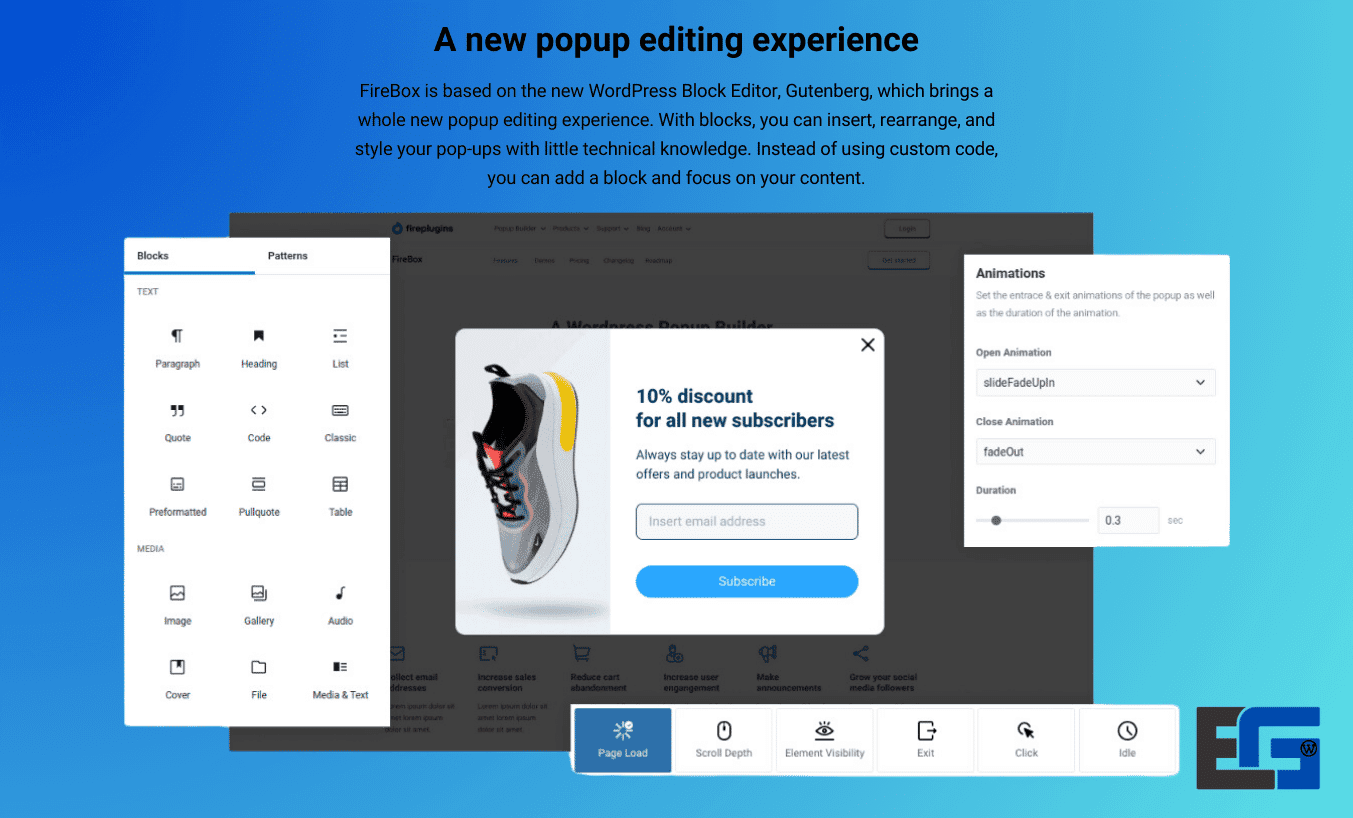
  • Firebox Pro comes with a range of pre-designed templates that can be easily customized to fit your brand’s aesthetics, making it simple to create visually appealing pop-ups.

Advanced Targeting Options:

  • You can target specific user behaviors, such as showing pop-ups based on cart value, products in the cart, or even the user’s location. This ensures the right message reaches the right audience.

Analytics and Performance Tracking:

  • The plugin includes built-in analytics to help you track pop-up performance, allowing you to see which campaigns generate the most conversions.

Mobile Optimization:

  • Firebox Pro is fully optimized for mobile devices, ensuring that your pop-ups look great and function smoothly on smartphones and tablets.
1. What is Firebox Pro?

1.1 Definition of Firebox Pro

Firebox Pro is a WordPress plugin that allows users to create professional pop-ups to engage visitors and encourage interaction with the site.

1.2 Why You Need Firebox Pro?

  • Improve conversion rates and increase email sign-ups.
  • Capture visitor attention through promotional offers and personalized messages.
  • Provide a seamless user experience without affecting site performance.

2. Benefits of Firebox Pro for WordPress Sites

2.1 Improving User Experience

  • Allows you to create attractive pop-ups without affecting site performance.
  • Provides dynamic content based on user behavior.

2.2 Seamless Integration with WordPress

  • Supports all modern versions of WordPress.
  • Works with most popular themes and plugins without issues.

2.3 Optimizing Site Speed

  • Firebox Pro is designed to be lightweight and does not slow down loading times.
  • Relies on clean code to minimize resource consumption.

3. How to Install Firebox Pro on WordPress

3.1 Installation Requirements

Before installing Firebox Pro, make sure to:

  • Update WordPress to the latest version.
  • Ensure your theme is compatible with the plugin.

3.2 Installation Steps

  1. Go to the WordPress dashboard.
  2. Click on “Plugins” > “Add New.”
  3. Search for Firebox Pro or upload the plugin file if you already have it.
  4. Click “Install Now,” then activate the plugin.

4. Basic Settings for Firebox Pro

After installation, go to the settings panel to adjust Firebox Pro options:

  • Control the timing of pop-up appearance.
  • Manage templates and designs.
  • Set up audience targeting based on visitor behavior.

5. How to Create Professional Pop-ups Using Firebox Pro

5.1 Types of Pop-ups

  • Email subscription forms.
  • Promotional ads and special offers.
  • Exit-intent notifications.

5.2 Customizing Pop-ups

  • Use the drag-and-drop editor to create appealing designs.
  • Add images, buttons, and animations to increase engagement.

5.3 Smart Audience Targeting

  • Set the timing of pop-ups based on how long visitors stay on the page.
  • Target visitors by their location or device.

6. SEO Optimization with Firebox Pro

6.1 SEO for Pop-ups

  • Use short, catchy text in pop-ups.
  • Ensure pop-ups don’t negatively impact the user experience.

6.2 Avoid Negative Impact on Google Rankings

  • Use non-intrusive pop-ups, especially on mobile devices.
  • Make sure visitors can easily close the pop-up.

7. Common Issues with Firebox Pro

7.1 Pop-up Not Appearing

  • Ensure the plugin is activated and settings are configured correctly.

7.2 Site Slowness After Installation

  • Disable other plugins that might conflict with Firebox Pro.

7.3 Compatibility Issues with WordPress Themes

  • Try changing the theme or updating it to the latest version.

8. Firebox Pro vs Other Plugins

Feature Firebox Pro Other Plugins
Ease of Use Easy to use Some plugins are complex
Site Speed Impact Lightweight More resource-heavy
Advanced Customization Fully integrated Limited in some plugins
Customer Support Fast, dedicated Slower support

9. User Experiences with Firebox Pro

Case Study:

  • A website using Firebox Pro noticed a 30% increase in email sign-ups just one week after using customized pop-up windows.

10. Frequently Asked Questions about Firebox Pro

10.1 Is Firebox Pro Free?

  • Firebox Pro offers a free version, but there is a paid version with additional features such as professional templates and advanced visitor targeting.

10.2 Does Firebox Pro Affect Site Speed?

  • No, it is lightweight and does not consume much resource. However, using too many pop-ups without proper management may slow down the site.

10.3 Can I Fully Customize the Pop-up Designs?

10.4 How Do I Get Technical Support for Firebox Pro?

  • Firebox Pro offers excellent technical support via the official site or email.

Firebox Pro Features on Eg-WP Site

Campaign Formats:

  • Lightbox Pop-up (Classic)
  • Slide-in Pop-up (From the Bottom)
  • Fullscreen Pop-up (Full Screen)
  • Sticky/Floating Bar
  • Floating Button Pop-up
  • Sidebar Pop-up
  • Welcome Mat (Pushes Content Down)
  • Embeds: Content displayed within pages, not as a pop-up.

Smart Triggers:

  • Page load
  • Exit-Intent (Pro)
  • Scroll Depth (Pro)
  • Element Visibility (Pro)
  • Click or hover
  • AdBlock detection (Pro)
  • Idle/Inactivity (Pro)
  • External link click

Advanced Targeting:

  • Customize visibility based on time, user, device, location, WooCommerce, etc.

Professional Editor and Full Customization:

  • Built on Gutenberg blocks: Easy drag-and-drop with full compatibility.
  • Over 300 ready-to-use templates for various occasions.(fireplugins.com, hr.wordpress.org)

Analytics and Goals:

  • Direct reports on views, average duration, submissions, conversion rates.

Performance and Compatibility:

  • Very lightweight: ~1.7 KB CSS and 24 KB JS.
  • Fully mobile-compatible.
  • SEO-friendly and GDPR-compliant.

Conclusion

Firebox Pro is a powerful tool for WordPress users that helps improve conversion rates and enhance the user experience through professional pop-ups. Whether you’re running an eCommerce store or a personal blog, Firebox Pro can be the perfect addition to your site.

No comment

Leave a Reply

Your email address will not be published. Required fields are marked *